Time Series Data
MIKE SHE uses the dfs0 file format for time series data. Various tools are available for converting ASCII and EXEL time series to the dfs0 file format. Time series data is required as input for most transient simulations, for example, daily records of precipitation. Transient simulations can also generate numerous dfs0 output files.
1. Creating Time Series in MIKE SHE
In most cases, you will create dfs0 files using the Create buttons in the MIKE SHE Setup dialogues. In this way, you can avoid the confusing task of assigning the Type of time series (e.g. precipitation) and EUM Unit type (e.g. millimetres) and the TS Type (e.g. reverse step accumulated). Each of these items are specified automatically.
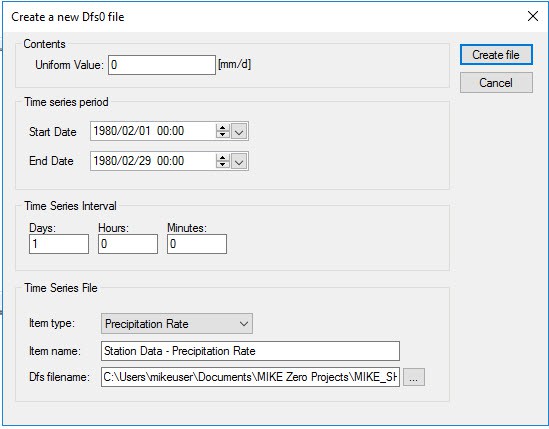
If you create time a time series using a Create button, the following dialogue will appear:
Uniform time series
Every time step will have the same value. You can create new dfs0 files from Excel and ASCII data using the Time Series Batch Conversion tool in the MIKE Zero Toolbox.
Time Series Period
The time series period is the extent of the time series. In a MIKE SHE simulation, all the time series files must cover the Simulation Period. The default time series period for a new time series file is the Simulation Period. However, if you change the time series period so that it does not cover the simulation period, you will receive an error message when MIKE SHE tries to run. If you try to add a time series file that does not cover the simulation period, then the OK button will remain greyed out and you will not be able to select the file. The constraints tab in the file selector dialogue gives you the reason that you cannot select the file.
Time Series Interval
The time series interval is the length of the individual time periods. The number of time periods is the length of the time series period divided by the period interval. The last period is shortened if necessary.
Time Series File
Every time series has an Item Type which is defined by the valid EUM Data Unit (see EUM Data Units) for the particular variable from which the Create dialogue was launched. In most cases, there is only one valid Type. In some cases, you may have a choice. For example, in Precipitation, you can choose between Precipitation Rate, which is the average amount of precipitation per time (e.g. mm/hour) in the time interval, and Rainfall, which is the measured amount of precipitation in the time interval (e.g. mm).
The Name is simply the name of the data item in the resulting .dfs0 file.
The file name has a default value, that you should change if you will be creating several files of the same type, such as multiple rain gauge time series files. Otherwise, you may accidentally overwrite the previous file.
Import from ASCII or Excel
The easiest way to import ASCII data into a dfs0 file is via the Windows clipboard. In this case, create a uniform time series file with the correct number of time steps and then highlight all of the data values. Then copy and paste the data from the ASCII file into the table.
You can create new dfs0 files from Excel and ASCII data using the Time Series Batch Conversion tool in the MIKE Zero Toolbox.
2. Working with Spatial Time Series
In the MIKE SHE Toolbox, there is a Tool in the File Converter section called dfs2+dfs0 to dfs2. In this utility you specify a dfs2 grid file with integer grid codes and a dfs0 file with time series data, where the dfs2 file grid codes are the item numbers in the dfs0 file.
The utility will read the dfs2 file and for each time step in the dfs0 file, it will substitute the grid code with the time series value.
The result is a dfs2 file with one grid for each time step and the grid values are the time series values.
3. Time Series Types
Specifies how the time step is being defined and how the measured value is being assigned to the time step. There are five different value types available:
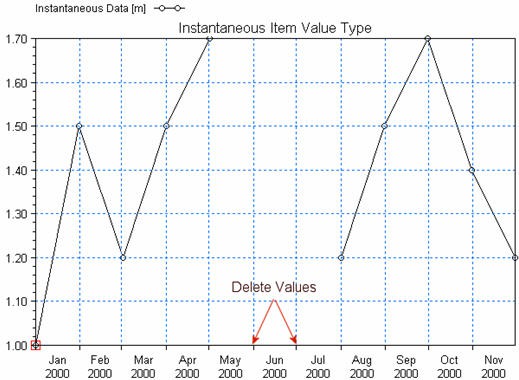
Instantaneous
The values are measured at a precise instant. For example, the air temperature at a particular time is an instantaneous value.
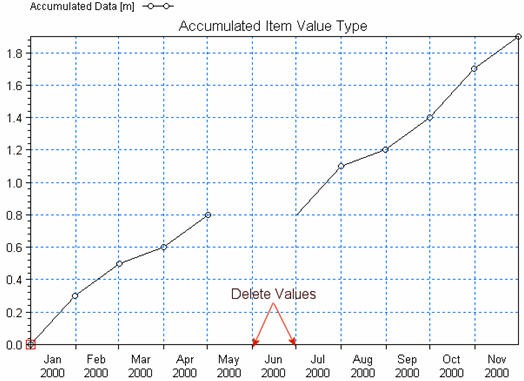
Accumulated
The values are summed over successive intervals of time and always relative to the same starting time. For example, rainfall accumulated over a year with monthly rainfall values.
Step Accumulated
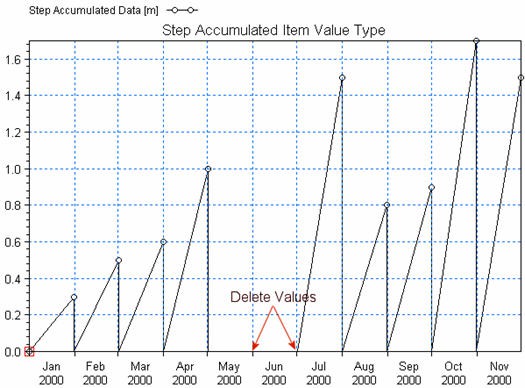
The values are accumulated over a time interval, relative to the beginning of the interval. For example, a tipping bucket rain gauge measures step-accumulated rainfall. In this case, the rain gauge accumulates rainfall until the gauge is full, then it empties and starts accumulating again. Thus, the time series consists of the total amount of rainfall accumulated in each time period- say in mm of rainfall.
Mean Step Accumulated
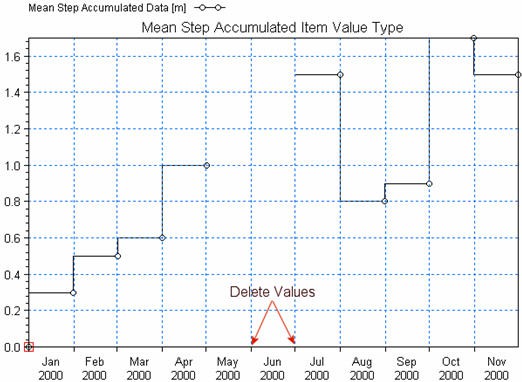
The values are accumulated over the time interval as in the Step Accumulated, but the value is divided by the length of the accumulation period. Thus, based on the previous example, the time series consists of the rate of rainfall accumulated in each time period - say in mm of rainfall per hour (mm/hr).
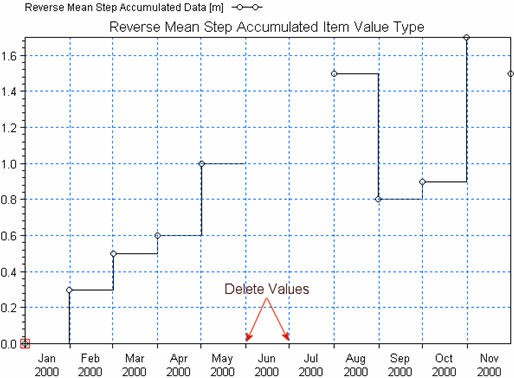
Reverse Mean Step Accumulated
In this case, the values are the same as the Mean Step Accumulated, but the values represent the time interval from now to the start of the next time interval. The Reverse Mean Step Accumulated time series are primarily used for forecasting purposes.