Python Plugins
1. Installing Python and Visual Studio Code
If you are an absolute beginner to Python, you can follow this link to a short YouTube tutorial that shows you how to install the latest stable Python version, Visual Studio Code (free-of-charge) and UV (helpful to manage and install virtual environments and python packages). The video will show you in 10 minutes, how to get to directly started with an existing or new Python code:
2. Introduction
This section describes the MShePy module, which enables the use of Python scripting with MIKE SHE. This includes:
- running Python plugins during a MIKE SHE simulation;
- running MIKE SHE simulations by Python scripts.
In the first case, the user can add plugins to a MIKE SHE model. A Plugin consists of a collection of code functions in Python performing custom functionalities. During preprocessing, the Python plugins are attached to the model and once the simulation is started, functions (or "slots") in the plugins will be connected to signals (e.g. before a time step). Signals will be emitted by MIKE SHE and trigger execution of one or more custom functions defined in the plugin. Once the function has finished to perform arbitrary tasks (e.g. exchange data with MIKE SHE), MIKE SHE will continue the normal execution.
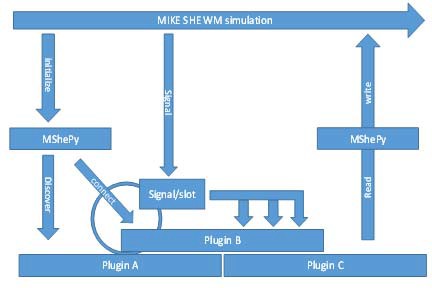
In the second case, the user can call and execute the water movement of a MIKE SHE model from a Python shell. This allows controlling the simulation time from the Python shell and exchange items between the MIKE SHE model and the Python environment before, during, and after the simulation.
3. Requirements
The MShePy module is available from MIKE Zero 2019 version 1. Only water movement (WM) can be accessed through MShePy. Thus, water quality simulations, the preprocessor and other components are currently not supported.
All water movement components can be accessed by MShePy. This includes:
- Overland flow
- River exchange items
- Unsaturated flow
- Evapotranspiration
- Saturated flow
MIKE SHE code is not reentrant, it cannot be safely interrupted and then called again (“re-entered”) before the previous execution has finished. This is due to its use of static or per-process variables, not all of those variables are reset to their initial state on finishing the simulation. This can be an issues if several simulations share a process. It is recommanded to put the code for executing MIKE SHE in a separate script, then fire up a new python process from the main script to call the MIKE SHE execution script. An example of such script can be found in this GitHub script, in run_variants_parallel.
4. How to enable Python plugins in the MIKE SHE user interface
In the Simulation Specification panel (below), tick the Enable Plugins option.
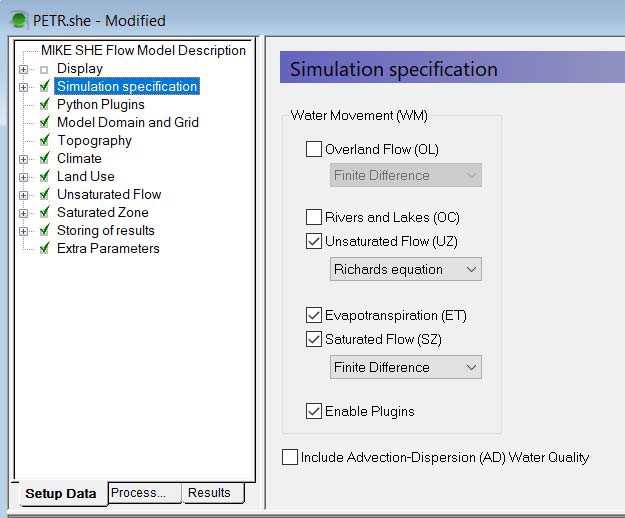
Figure 14.1 How to enable plugins
Then open the Python Plugins panel (Figure 14.2). Under Python Library you can specify how to find the Python dynamic library. "Search default locations" means the operating system´s default search order will be used. On MS Windows this is the application´s directory, several system folders, the current directory and directories in the system PATH variable. The most recent Python version will be preferred. When you tick "Specify" instead you can provide the location of the Python library file (e.g. python39.dll for version 3.9). You can find it in the installation directory of your Python distribution.
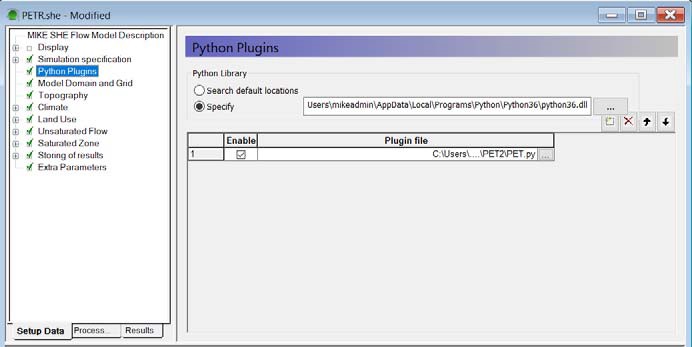
Figure 14.2 Python Plugins panel in editor
Use the insert button to add plugin files to the simulation. Several plugin files can be added to the same MIKE SHE model. Provide the location of the plugin Python file (*.py) and tick the box in the Enable column to activate a plugin file. The order of plugin files in this table will determine the order of execution during the simulation.
5. Creating a Python plugin
The first step is to import the MShePy module by the command import MShePy. The command will import the MShePy version corresponding to the specified Python version (see previous section).
The second step is to define at which point of the simulation custom functions defined in the plugin should be executed. MIKE SHE emits six different signals at predefined moments in the simulation. For each signal that is being emitted one or more plugin functions can be executed. The connection between the signal and the plugin function (or “slot”) is simply made by a naming convention. The function definitions are shown in Table 14.1 below.
Table 14.1 Function definitions
| Moment in the simulation | Python function definition |
|---|---|
| During early initialization | def enterSimulator(): |
| At the end of the initialization | def postEnterSimulator(): |
| At the beginning of each time step | def preTimeStep(): |
| At the end of each time step | def postTimeStep(): |
| After the last time step | def preLeaveSimulator(): |
| Right before closing MIKE SHE, after output files have been closed | def leaveSimulator(): |
The third step is to describe actions, which are executed at the defined moments during the simulation, possibly using functions available in the Python environment. An overview of functions included in the MShePy library is provided in the following section. The same plugin file can contain different functions executed at different moments in the simulation. A simple example is shown below for a function printing in the log file the initial timestep count(0) and then the timestep number at each timestep.
import MShePy #Import MShePy module

timestep = 0 #Define a global variable

def enterSimulator(): #Define the time slot

global timeStep

MShePy.wm.log("The timestep is {0}".format(timeStep)) #Print initial timestep in log file

def postTimeStep(): #Define the time slot

global timeStep

MShePy.wm.log("The timestep is {0}".format(timeStep)) #Print timestep in log file

timeStep +=1 #Calculate next time step
6. Functions available in the MShePy library
A description of the functions available in the MShePy library can be obtained by typing help(MShePy) in Python or by typing the name of a specific function (e.g. help(getValues)).
7. How to exchange MIKE SHE items with Python
MShePy provides access to certain MIKESHE exchange items. Some of these are both for in- and output, others may be for either in- or output only. All MIKE SHE items that can be accessed from Python are listed in the summary tables at the end of this chapter. The availability of MIKE SHE items depends on the processes selected in the Simulation specification panel. For example, if the evapotranspiration component is not included in the simulation, then no parameters related to evapotranspiration will be available. The accessible variables are listed in the *_WM.log file, once preprocessing and water movement initialization has been executed.
In order to exchange MIKE SHE items between the Python plugin and the MIKE SHE simulation two functions are available in the MShePy module:
- MShePy.wm.getValues() to retrieve a copy of items from MIKE SHE to Python;
- MShePy.wm.setValues() to change the value of MIKE SHE items in the simulation.
The input of the MShePy.wm.getValues() is a MIKE SHE parameter ID. This can be defined using MShePy.paramTypes.* followed by the abbreviation corresponding to the parameter (see summary tables at the end of this chapter for the list of abbreviations). The output of the getValues function is a tuple containing the starting time as a datetime.datetime object, the current time as a datetime.datetime object, and a MshePy dataset containing the value of the selected MIKE SHE item (see following section for a description of theMShePy dataset).
MShePy.wm.getValues(MShePy.paramTypes.P_RATE) (datetime.datetime(2000, 1, 5, 22, 0),

datetime.datetime(2000, 1, 6, 0, 0),

MShePy36.dataset: "precipitation rate", Precipitation Rate (meter/sec), in: Global value, out: BaseGrid, shape: [100, 3], size: 296)
The input to MShePy.wm.setValues() is a MShePy dataset. How to create and handle a MShePy dataset is described in the following section.
8. How to create and handle MShePy datasets
The function MShePy.dataset() can be used to create a dataset. The argument of the function is a MIKE SHE parameter ID (MShePy.paramTypes.*). The characteristics of the dataset, such as the dimension and the unit, depend on the properties of the selected MIKE SHE parameter and will be automatically set to match the model setup. An overview of these parameters and their properties is given in the summary tables at the end of this chapter.
The string representation of a MShePy dataset object contains some of its properties (see example below). The displayed properties include:
- The parameter description (e.g. “precipitation rate”)
- The current unit (e.g. meter/sec)
- The input and output dimension (e.g. Global value)
- The shape, which indicates the number of elements in each dimension
- The size, or total number of elements
MShePy dataset objects can be indexed using square brackets. The number of inputs in the square brackets depends on the dimension of the object. For instance, 2 inputs can be given for the precipitation rate object in the example below (e.g. data[1,1]). Slices can be selected by using the colon (e.g. data[1:3,1], data[:,1] or data[1:3:2,1]). The *.value() attribute can also be used to display all values inside a MShePy dataset or to change all values in a dataset by specifying the new value as an argument (e.g. data.value(10.0))
(startTime,endTime,data)=MShePy.wm.getValues(MShePy.paramTypes.P_RATE)

data

MShePy36.dataset: "precipitation rate", Precipitation Rate (meter/sec), in: Global value, out: BaseGrid, shape: [100, 3], size: 296

data[1,1] 0.0

data[1:3,1] [0.0, 0.0]

data.value(10.0)

data[1:3,1] [10.0, 10.0]
The dimension shown in the summary tables at the end of this chapter refers to the standard dimension the MIKE SHE item has, which is also the dimension the output item has. However, the real dimension of input items may change depending on the selected option in the MIKE SHE interface. For example, the precipitation rate is by standard 2 dimensional (BaseGrid in the previous example), but the input item can also be a global value when the option Uniform is selected in the Precipitation Rate panel in the MIKE SHE user interface (see Figure 14.3 below).
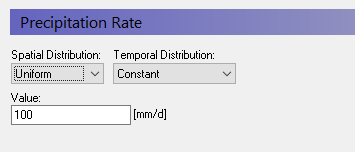
Figure 14.3 Precipitation rate panel
The number of elements in each dimension of a MShePy dataset object can be retrieved by the function *.shape(). In the example below, data.shape() returns [100,3]. Similarly, *.size() function returns the total number of elements in a MShePy dataset object (e.g. 196), or the extent in a given dimension when the index of the dimension is given as a parameter, e.g. *.size(1).
In order to retrieve the unit of a MShePy dataset object, the function *.unit() is available. No arguments are required and the function returns the unit of the dataset object. Note that this unit may be different from the unit selected in the MIKE SHE GUI. In the following example, data.unit() would return ‘meter/sec’, while the default unit of the precipitation rate in the MIKE SHE GUI is ‘mm/d’.
data

MShePy36.dataset: "precipitation rate", Precipitation Rate (meter/sec), in: Global value, out: BaseGrid, shape: [100, 3], size: 296

data.shape() [100, 3]

data.size() 296

data.unit() 'meter/sec'
It is also possible to set a different unit without doing any conversion by calling *.unit() with an argument. This may be useful when creating a new dataset or for setting the correct unit when making calculations that are supposed to result in a different unit.
(startTime, endTime, data) = MShePy.wm.getValues(MShePy.paramTypes.SZ_HEAD)

data[20,22,1] 9.202210426330566

data.unit() # get default unit 'meter'

data.convert("inch") # cannot do this conversion, see error: Traceback (most recent call last): File "\<stdin\>", line 1, in \<module\> LookupError: "inch" is a known unit, but it does not match the item type "Elevation" of the dataset.

data.convert("feet")

MShePy36d.dataset: "head elevation in saturated zone", Elevation (feet), in: SZ3DGrid, out: SZ3DGrid, shape: [50, 50, 3], size: 5652

data[20,22,1] # get the value that now is in feet 30.190979089011048
The MShePy library allows arithmetic operations with MShePy datasets: addition, subtraction, multiplication, division, exponentiation, absolute value, negative value, and positive value. The resulting MShePy dataset will have the properties of the first MShePy dataset in the equation (in the example below, NEW is the same dataset type as HEAD, while NEW1 is the same as ET).
Arithmetical operations where MShePy datasets are sliced using square brackets( e.g. ET[:] = HEAD[:,:,0]), will not replace dataset object, but only the values inside it.
(startTime, currentTime, ET) = MShePy.wm.getValues(MShePy.paramTypes.ET_REF_EXC)

(startTime, currentTime, HEAD) = MShePy.wm.getValues(MShePy.paramTypes.SZ_HEAD)

NEW=HEAD+ET

NEW

MShePy36.dataset: "head elevation in saturated zone", Elevation (meter), out: SZ3DGrid, shape: [100, 3, 1], size: 296

NEW1=ET+HEAD

NEW1

*MShePy36.dataset: "reference evapotranspiration (OpenMI)", Evapotranspiration Rate (meter/sec), in: Global value, out: BaseGrid, shape: [100, 3], size: 296

ET[:] = HEAD[:,:,0]

ET

MShePy36.dataset: "reference evapotranspiration (OpenMI)", Evapotranspiration Rate (meter/sec), in: Global value, out: BaseGrid, shape: [100, 3], size: 296