MIKE ECO Lab Templates
A MIKE ECO Lab Template contains the mathematical description of the ordinary differential equations to be solved. These could, for example, describe an ecosystem including the processes affecting the ecosystem.
A MIKE ECO Lab template contains six components:
- State Variables - State variables represent the state that the user wants to predict (at least one state variable must be specified).
- Constants - Constants are used as arguments in the mathematical expressions of processes in a MIKE ECO Lab model. They are constant in time, but can vary in space.
- Forcings - Forcings are used as arguments in the mathematical expression of processes in a MIKE ECO Lab model. They can vary in time and space. They basically represent variables of an external nature that can affect the ecosystem.
- Auxiliary Variables - Auxiliary Variables are arguments in the mathematical expression in a MIKE ECO Lab model. They can be used as intermediate calculations that can include any state variable, constant or forcing. They can also be used to specify results directly.
- Processes - Processes describe the transformations that affect the state variables. That means processes are used as arguments in the differential equations that MIKE ECO Lab solves to determine the state of the State Variables.
- Derived Outputs - Derived Outputs are output files that are derived based on the model results.
Additional details on developing MIKE ECO Lab templates is available in the MIKE ZERO ECO Lab manual.
Warning
All concentrations passed from MIKE SHE to MIKE ECO Lab are in units of [g/m3], which is equivalent to [mg/L].
Thus all parameters and equations defined in the MIKE ECO Lab template must reflect these units - either directly or via an appropriate scaling factor. For example, the correct units for a decay rate constant might be [g/m3/day] or [mg/L/day].
1. Developing a template
Creating and developing a MIKE ECO Lab template involves several steps.
1. Create a MIKE ECO Lab template
First you must create a MIKE ECO Lab template from the File/New menu or the New File icon. In both cases, you will chose MIKE Zero and then MIKE ECO Lab (.ecolab) in the New File dialogue. This will create a new blank MIKE ECO Lab template file.
Alternatively, you can copy and edit an existing MIKE ECO Lab template. A few tips will be useful before you start.
- You should try to keep the names of the Constants, Forcings, etc. as short as practical. The names are used when defining Processes, Auxiliary Variables, and Derived Outputs.
- The names used in the definitions are case-sensitive.
- The names must be unique within the list of Constants, Forcings etc.
- To add a new Constant, Forcing, etc. right click on the item and chose the appropriate option.
2. Add State Variables to the Template
The only available State Variables are species concentrations. You must add one State Variable item for each Species in MIKE SHE that you want MIKE ECO Lab to modify during the WQ simulation.
The MIKE ECO Lab template must include at least one State Variable.
Note
The State Variable name must be exactly the same as the Species name in MIKE SHE.
The exception to the exact naming rule is when simulating Dual domain mass transfer. In this case, the State Variable name must use the reserved suffix "_2" for the solute in the secondary porosity. For example, OXYGEN and OXYGEN_2 would be the State Variable names for the species OXYGEN in MIKE SHE.
3. Add one or more Constants
Constants are spatially distributed values that are constant in time. Each constant is either pre-defined by the MIKE SHE setup (MIKE_SHE_SUPPLIED_- CONSTANT), or it is User Defined in the MIKE SHE model. All other values will be ignored.
Pre-defined MIKE SHE Supplied Constants*
If the Constant is defined by the MIKE SHE model setup, then the Built in ID must be MIKE_SHE_SUPPLIED_CONSTANT.
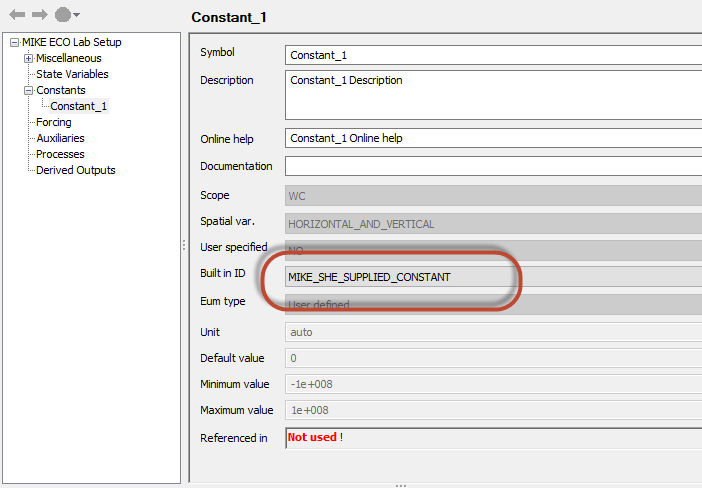
The available pre-defined MIKE SHE Supplied Constants are different depending on hydrological context (ie Overland Flow, UZ or SZ)..
Table 39.1 Available MIKE SHE Supplied Constants
| Overland Flow | Unsaturated Zone | Saturated Zone |
|---|---|---|
| Cell size | Cell size | Cell size |
| Topography | Cell volume | Cell volume |
| Detention storage | Topography | Topography |
| Depth to cell top | Depth to cell top | |
| Depth to cell bottom | Depth to cell bottom | |
| Saturated water content | Primary porosity | |
| Macropore porosity | Secondary porosity | |
| Primary bulk density | Primary bulk density | |
| Secondary bulk density | Secondary bulk density |
The Symbol name that you define is carried over to the MIKE SHE list of Constants. In the MIKE SHE list of constants, you will define the actual value that will be supplied by MIKE SHE to MIKE ECO Lab.
User Defined Constants
If your Constant is not a pre-defined MIKE SHE constant, then you must define a value for the constant. In this case, you must define it as User Defined Constant.
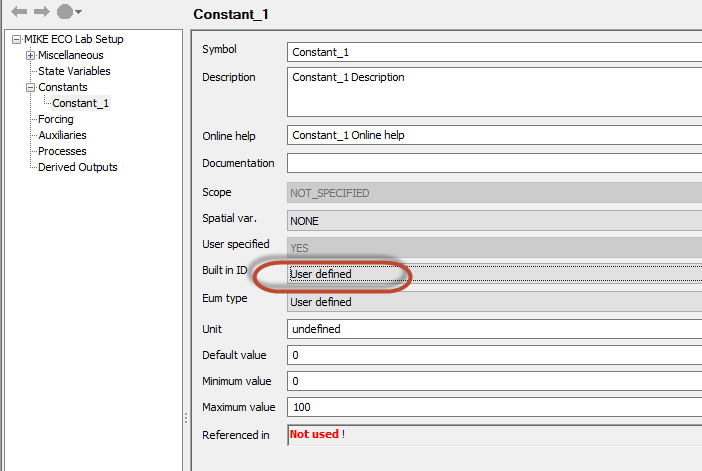
The actual values and spatial distribution of the Constant will be defined in the MIKE SHE Setup Editor. Any User defined Constants will be added to the list of constants under each of the domains (ie OL, UZ and SZ).
In the template, the only thing you need to specify is the name of the Constant. The name is then used when defining the Processes, Derived Outputs, etc.
If you have already defined the Constant in the Setup Editor, you may need to define it again in the list of Constants in the Setup Editor. This is most easily done by re-loading template with the browse button.
4. Add one or more Forcings
A Forcing is any spatially distributed value that is time varying. You can think of it as a value that is affecting the State Variable during the simulation. For example, air temperature will affect the degradation rate of a solute.
Similar to the Constants, each forcing is either pre-defined by the MIKE SHE setup (MIKE_SHE_SUPPLIED_FORCING), or it is User Defined in the MIKE SHE model. All other values will be ignored.
Pre-defined MIKE SHE Supplied Forcings
If the Constant is defined by the MIKE SHE model setup, then the Built in ID must be MIKE_SHE_SUPPLIED_FORCING.
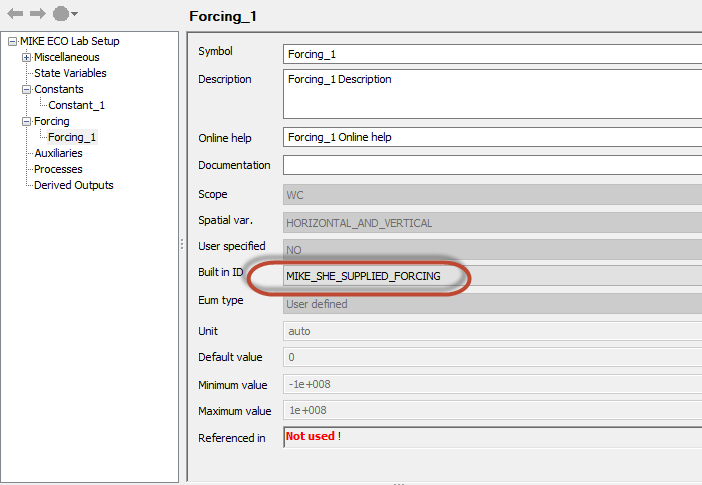
The available pre-defined MIKE SHE Supplied Forcings are different depending on hydrological context (ie Overland Flow, UZ or SZ)..
Table 39.2 Available MIKE SHE Supplied Constants
| Overland Flow | Unsaturated Zone | Saturated Zone |
|---|---|---|
| Time step length | Time step length | Time step length |
| Precipitation rate | Precipitation rate | Precipitation rate |
| Air temperature | Air temperature | Air temperature |
| SW solar radiation | SW solar radiation | SW solar radiation |
| Depth of overland water | UZ Water content | Depth to phreatic surface (positive) |
| Depth to phreatic surface (positive) | Macropore water content | SZ potential head |
| SZ potential head | Depth to phreatic surface (positive) | SZ saturated thickness |
| SZ potential head | Soil temperature | |
| Soil temperature |
The Symbol name that you define is carried over to the MIKE SHE list of Forcings. In the MIKE SHE list of forcings, you will define the actual value that will be supplied by MIKE SHE to MIKE ECO Lab.
!!!Note: The various other “MIKE_SHE_” forcings are used by MIKE 1D to define concentrations and mass of solute entering the river.
5. Create Auxiliary Variables, Processes and Derived Outputs
Auxiliary variables are used for intermediate calculations and must be defined as 3D (UZ and SZ) or 2D variables.
Processes transform a State Variable or calculate another result. Spatial variation and type must be defined for each process. Each process can be included in the results file by choosing "YES" in the "Output" box.
Derived Outputs allow the user to define output files based on the process results.
2. MIKE ECO Lab templates in MIKE SHE
MIKE ECO Lab is only available when Water Quality is selected. Thus, to be able to use MIKE ECO Lab, the Water Quality option in the main Simulation Specification dialogue must be selected
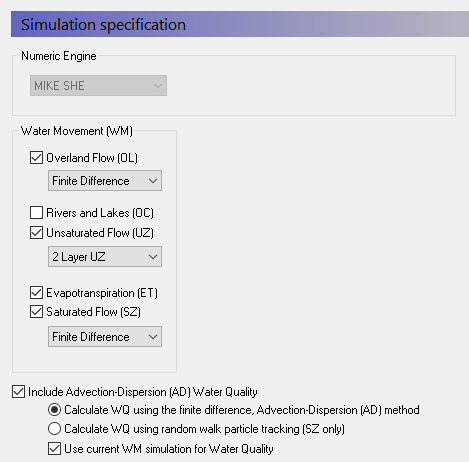
Note also that MIKE ECO Lab will only work with the Finite Difference AD method.
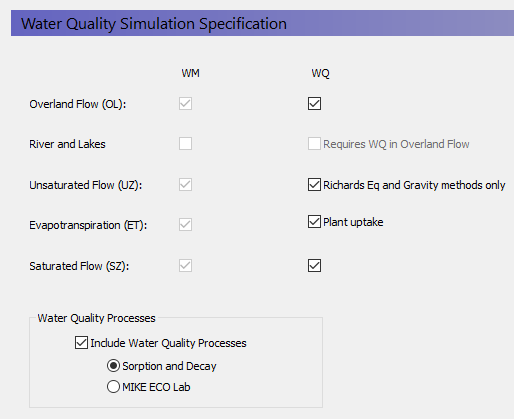
After activating the Water Quality module, the MIKE ECO Lab option must be selected in the WQ Simulation Specification dialogue.
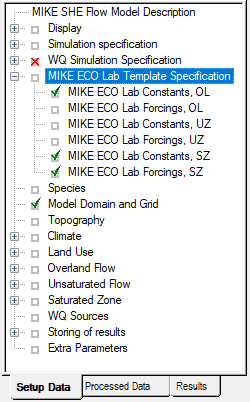
A new data tree branch will appear, where MIKE ECO Lab templates can be specified for each of the hydrologic processes - Overland Flow, the Unsaturated Zone, and the Saturated Zone. Separate templates are required for each of these zones because the processes in each of these domains are very different
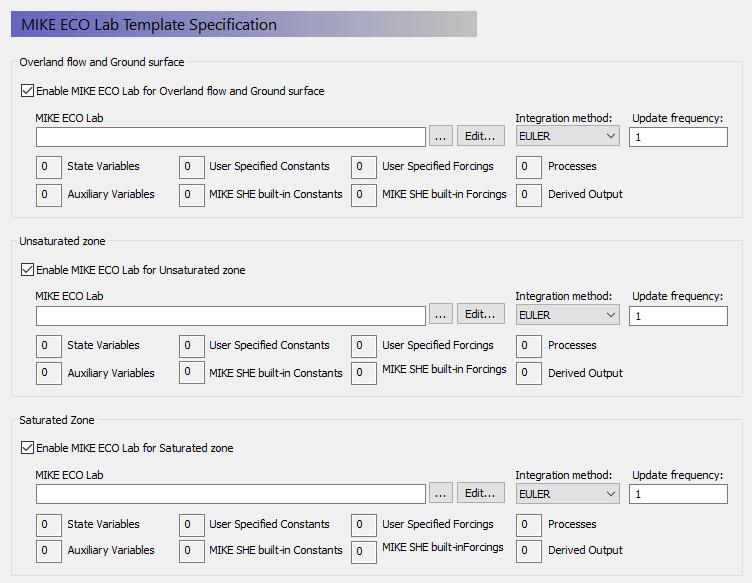
In the MIKE ECO Lab Template Specification dialogue, there is a checkbox for each of the processes. These checkboxes are active if the Water Quality is activated for the process in the WQ Simulation Specification dialogue
 .
.
When you enable MIKE ECO Lab for the specific process, you will be able to browse to the required MIKE ECO Lab template. Specified templates can be directly modified by clicking on the Edit button.
When you browse to a template, the template file is read by the Setup Editor and the number of components (i.e. State Variables, Forcings, Processes, etc.) that have been specified in the template are displayed in the Template summary.

When calculating the concentrations (State Variables) for the next time step, an explicit time-integration of the transport equations is made. Depending on the desired accuracy of this numerical integration, you can chose one of three different integration methods. The methods are in increasing level of accuracy (and numerical effort), starting with the Euler method and finishing with the Runge Kutta 5th Order method).
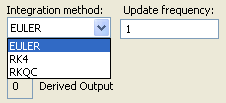
Finally, for each template you can specify an update frequency (see above). The update frequency tells MIKE SHE how frequently to call MIKE ECO Lab. If the water quality processes are slow relative to the simulation time step, you can save considerable simulation time by calling MIKE ECO Lab less frequently. For example, to call MIKE ECO Lab every second or third simulation time step, you would specify an Update frequency of 2 or 3.
3. State Variables in MIKE SHE
The State Variables defined in the MIKE ECO Lab template are passed to MIKE SHE as Species. This is the only way to pass information from MIKE ECO Lab to MIKE SHE.
The Species Name in MIKE SHE must be exactly the same as the State Variable Name used in the MIKE ECO Lab Template (except in the case of dual domain mass transfer, which uses the reserved suffix “_2”).
There are four species types in MIKE SHE. Species can be either:
- Dissolved
Dissolved species are mobile in the water. They are active in the subsurface and surface water. Dissolved species have a default concentration of [\(\mu g/m3\)].
- Sorbed
Sorbed species are only available in the subsurface. They are fixed to the soil matrix and do not move with the water. Sorbed species have a default concentration of [g/g].
- Suspended
Suspended species are only available in ponded water. They do not infiltrate to the UZ or SZ, and they cannot become Sorbed species. If the ponded water infiltrates, the species is left behind. Suspended species have a default concentration of [\(\mu g/m3\)].
- Fixed
A fixed species is neither dissolved or nor sorbed. It is used as an immobile state variable by MIKE ECO Lab. This allows MIKE ECO Lab to read and write arbitrary values to MIKE SHE during the simulation. Fixed species have an undefined unit.
In particular, the Fixed species is especially interesting in MIKE SHE. It is a species type without pre-defined units of concentration. The non-dimensional species cannot be transported with the flow and can be used as a book-keeping mechanism for resulting processes. MIKE ECO Lab itself can read a value from any file, update the value and write it back to the file. However, MIKE ECO Lab cannot append a new value to a file. That is, MIKE ECO Lab cannot read a value, update the value and add the new value as a new time step in file. The Fixed species type gives you a mechanism for handling various auxiliary user defined quantities during the simulation. In other words, MIKE ECO Lab can read the current Fixed species value, and return a new value to MIKE SHE. MIKE SHE moves forward in time, and MIKE ECO Lab starts over again. In the mean time, MIKE SHE has saved the value from the previous time step. This mechanism greatly increases the flexibility of the MIKE ECO Lab coupling in MIKE SHE. It allows you for example, to create things like ecological indexes that map changing ecohydrologic conditions over time.
4. Specifying Constants and Forcings in MIKE SHE
When you browse to the MIKE ECO Lab template, the template is read by MIKE SHE’s Setup Editor to find the MIKE_SHE_SUPPLIED_FORCINGS and MIKE_SHE_SUPPLIED_CONTANTS used in the template. These are separated into Built-in and User Specified Forcings and Constants. In both cases, the Forcing or Constant is added to the appropriate list of Forcings and Constants in the MIKE SHE data tree - separated into the different domains (OL, UZ, and SZ).
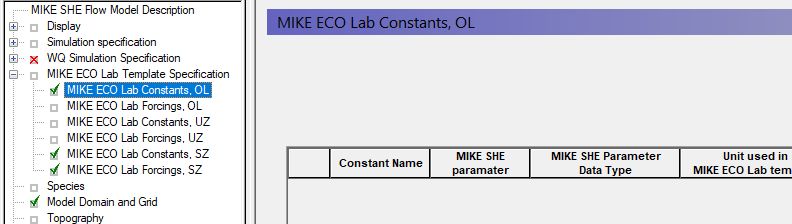
Built-in Forcings and Constants
If the Forcing or Constant is not user defined (User Defined = “NO”), then the Forcing or Constant is an internal value in MIKE SHE and will be passed automatically to MIKE ECO Lab. The list of available parameters is quite short - primarily geometry related (e.g. cell volume), plus a few domain specific constants (e.g. porosity).
After selecting the parameter from the list of available parameters in the combo box, select the units that are being used in the template. The list of units is taken from the standard available units in the EUM database for the particular item. The Constant or Forcing can be used in various equations in the template. However, there is no check on the units being used. So, it is expected that the Forcing or Constant will used one of the options from the list of units in the EUM database. Otherwise, and appropriate conversion must be done in the template equation.
User Specified Forcings and Constants
If the Forcing or Constant is user defined (User Defined = “YES”), then the Forcing or Constant must be specified explicitly in MIKE SHE.
In this case, there is nothing to specify on the main list of Forcings and Constants, but a Forcing or Constant item is added to the data tree down under the appropriate branch in the data tree. In this branch you will find a table of user specified Forcings and Constants, plus individual sections for each item. Each item can be spatially defined similarly to other constants or time varying values in MIKE SHE.
Note
The Forcings and Constants are defined by Water Quality layer in the Saturated Zone. Thus, you have to define at least one Water Quality Layer in the Saturated Zone.
The list of user defined Forcings and Constants is initially taken from the template. However, the list is not fully dynamic. Thus, if you add items to the template, these will be added to the list. However, if you remove items from the template, or change the name in the template, the item will not be removed from the list. This allows you maintain your data inputs while you are developing your template. Any data that is not used in the template will be pre-processed like any other data, but will not be used in MIKE ECO Lab. If you don’t need the items any more, you can delete them from the list.
Tip
The fact the list of user specified Forcings and Constants is not permanently linked to the template, allows you to pre-process any static or time-varying data and map it to the numerical grid. You can then use this preprocessed data in other grid operations in MIKE SHE.
5. Running MIKE ECO Lab with MIKE SHE
To run MIKE ECO Lab with MIKE SHE, simply pre-process and run the model normally. You can view the user specified Constants and Forcing in the Pre- processed tab. The Derived Outputs will be written to the default output directly along with all of the regular output from MIE SHE. The Auxiliary Variables and Processes will also be written to this directory, if the Output option is on.
All output can be viewed or processed normally with all of the regular MIKE Zero tools.