Sources
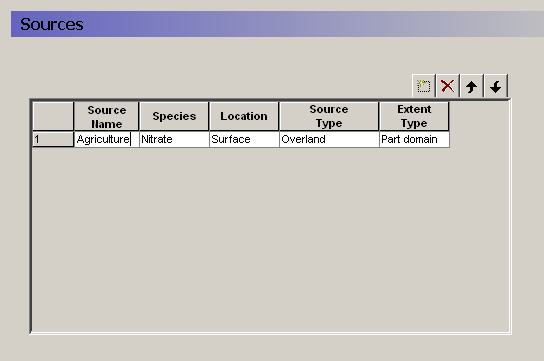
The specification of water quality sources is very flexible. The Sources dialogue allows you to add and delete sources, as well as define the type and location of the source. The table provides an overview of all of your sources in your model.
An important feature of the source location definition is the partial extent distribution function. This allows you to define, for example, a distributed global source file - say of the field scale agricultural inputs in your catchment - and run individual water quality scenarios for each sub-catchment (modelled as an partial extent) to assess the subcatchment contributions to the global stream impact.
Source Name
The name appears in the data tree for reference.
Species
You can only choose from the list of available species that you have defined in the Species dialogue.
Location
The location is defines whether the source is located on the ground surface (Surface) or in the saturated or unsaturated zone (Sub-surface). The available source types depend on where the source is located.
Source Type
If the source is located on the ground surface, then it can be either a Precipitation source (concentration in precipitation water) or an Overland source (mass on the surface). In both cases, the solute can infiltrate or runoff as lateral overland flow.
Extent Type
The source can cover the entire domain (Full domain) or only part of the domain (Part domain). In both cases, the actual source strength can very spatially and temporally. The Extent is used simply to restrict the source data to a zone smaller than the model domain.
Related Items:
- Solute Transport in the Saturated Zon
- Solute Transport in the Unsaturated Zone
- Solute Transport in Overland Flow
1. Strength
| Strength | |
|---|---|
| dialogue Type: | Time-varying Real Data |
| EUM Data Units | Grid Code |
| Time Series EUM Data Units | Concentration or Mass per time |
Since the source is a common data item for overland, unsaturated and saturated flow, the units of the source strength depend on the type of source being simulated.
The source strength comprises both a distribution and a value. The distribution can be either uniform, sub area-based or fully distributed. If the data is sub area-based then for each station a sub-item will appear where you can enter the time series of values for the station. If the data is fully distributed, then you can enter a time varying dfs2 file.
Related Items:
- Solute Transport in the Saturated Zone
- Source/Sinks, Boundary Conditions and other Exchanges in the saturated zone
- Solute Transport in the Unsaturated Zone
- Source/Sinks, Boundary Conditions and other Exchanges in the unsaturated zone
- Solute Transport in Overland Flow
- Source/Sinks, Boundary Conditions and other Exchanges in overland flow