Vegetation Properties Editor
The vegetation editor is used to specify vegetation data for the evapotranspiration and irrigation management modules. The vegetation database contains the time varying vegetation characteristics for each type of vegetation that is specified in the model domain.
The vegetation database is optional and can be used only when the Evapotranspiration (ET) and Unsaturated Zone components are included in the model.
1. Vegetation Database Items
The vegetation database is organized around a data tree similar to the setup editor. To create a vegetation type in the database and populate with the corresponding data, simply add a vegetation item in the main dialogue and then fill out the tables in the dialogues that appear in the data tree under the new vegetation item.
a. Specifying Vegetation Properties in a Database
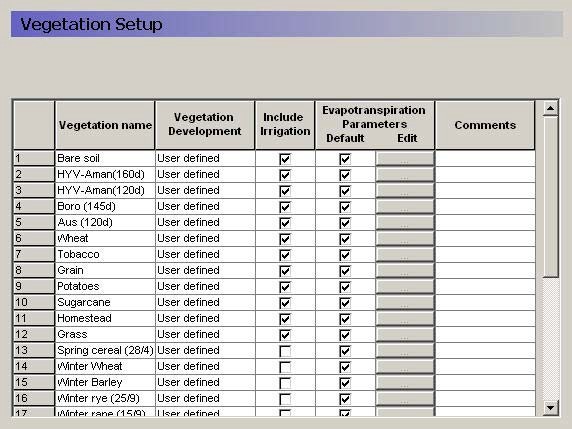
The vegetation database is populated with data in a number of steps. Firstly, all the vegetation types to be included in the database are entered in a table in the Vegetation Setup Menu. The data needed are:
- Vegetation name;
- Vegetation Development;
- Include Irrigation;
- Evaporation parameters.
If the Irrigation module is used in the model you, may chose to use the irrigation demand values from the vegetation file. In this case, you should select the ’Include Irrigation’ option and then specify the irrigation demand parameters by vegetation type.
You can also specify specific Evaporation Parameters for each vegetation type. If the ’Default’ value is checked, then the global values defined in the main vegetation dialogue (shown below) will be used:
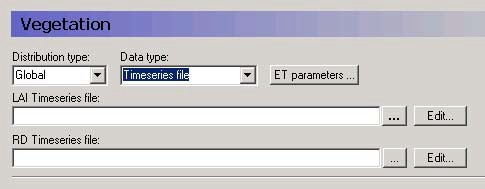
If the default value is unchecked, then you can specify the ET parameters by vegetation type.
b. Vegetation stages
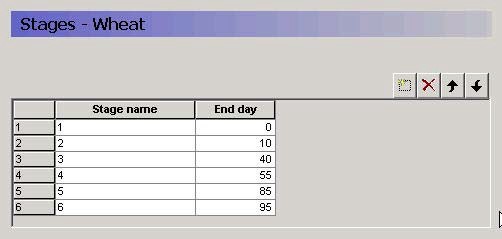
The first thing to do, is to specify the standard vegetation stages for each crop or land use type in the database. These temporal variations in vegetation characteristics can normally be described by a number of characteristic stages of specific length. The changes are defined as a set of linear changes between two consecutive crop stages. Three parameters describe the stage, the leaf area index (LAI), the root depth (RD), and the crop coefficient \(K_c\).
Warning
The values of \(LAI\), \(RD\) and \(K_c\) are defined as Instantaneous parameters. Therefore, it is critical that you start with a Stage at 0 days. Otherwise, your initial value for \(LAI\), \(RD\) or \(K_c\) will be zero.
The day number indicates the cumulative days from crop establishment (e.g. sowing) to the end of the specific crop stage.
If in the Vegetation dialogue, subsequent start dates overlap with the development cycle, a warning will be issued in the log file that says the crop development was not over yet before the new crop was started. MIKE SHE will then start a new crop cycle at the new start date.
c. Evapotranspiration Parameters
The parameters used in the evapotranspiration calculations can be divided into three groups, which regulate interception, soil evaporation and plant transpiration, respectively.
Note
The C1, C2, C3 ,and AROOT parameters are only used in the Richards Equation and Gravity Flow methods, and not in the 2-Layer UZ method.
d. Vegetation Development Table
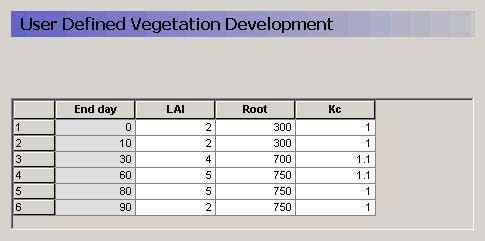
For each crop stage, three vegetation parameters need to be specified:
- \(LAI\) - The Leaf Area Index, which is the (Area of leaves)/(Area of the ground), can vary between 0 and 7 depending of the vegetation type;
- \(Root\) - The Rooting Depth of the crop. It will normally vary over the season. Consideration about the soil type should be taken because some crops may develop different root distribution depending on the soil characteristics;
- \(K_c\) - The crop coefficient.
The leaf area index and the root depth should be specified at the end of each crop stage. The development of LAI and root depth between the specified values are then interpolated linearly by the model. In addition to these parameters, it is often necessary to supply the crop coefficient (\(K_c\)), which is used to adjust the reference evapotranspiration relative to the actual evapotranspiration of the specific crop.
By the FAO definition, the reference evapotranspiration represents the potential evapotranspiration for a 8-15 cm high reference grass plane with ample water supply. Most farm crops may differ from this in two ways:
- In the early crop stages, where LAI of the farm crop is lower than the LAI of the reference grass crop, the evapotranspiration of the farm crop is less then the calculated reference evapotranspiration. This is accounted for in the Kristensen & Jensen ET calculation, since a crop LAI is used as input. Therefore, for most field crops it is therefore not necessary to specify Kc values below 1 in the early crop stages.
- In the crop mid-season the opposite situation may occur where crop potential evapotranspiration is larger than the calculated reference evapotranspiration of the reference grass crop. This is not handled in the ET calculations, and Kc values above 1 may therefore be relevant for some crops in the mid-season during the period where crop leaf area index is at its maximum.
A Kc value of 1 means that the maximum evapotranspiration rate will equal the reference evapotranspiration rate.
If pan evaporation data are used in place of reference evapotranspiration data in the model input, it often necessary to apply site specific pan coefficients to convert the pan evaporation to reference evapotranspiration. Pan coefficients are normally in the range 0.5 – 0.85.
e. Irrigation Parameters
In the irrigation module the amount of irrigation applied can be driven by the amount of water demanded by the crop. That is, in drier periods more irrigation water is required, so more irrigation is applied.
In the Irrigation demand dialogue, if you specify that the Vegetation Property file should be used for the demand calculations, then the demand values will be read from the vegetation file specified in the Vegetation dialogue.
Further, in the irrigation module, you specify the type of demand calculation:
- User specified
- Maximum allowed deficit
- Crop stress factor
- Ponding depth
In the Irrigation dialogue of the Vegetation properties file, you must specify a value for each of these demand types. Although, those that will not by used, may be left at the default values.
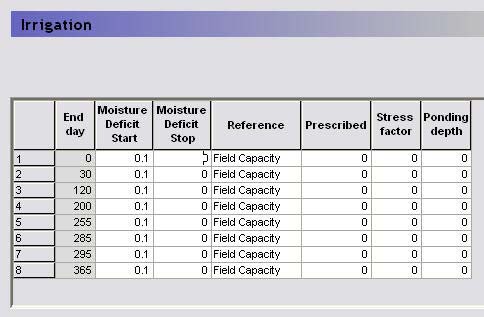
Maximum allowed deficit - If irrigation is handled automatically based on the actual moisture content in the soil, the soil moisture deficits are the deficits at which irrigation is going to start and stop. The soil moisture deficit is defined relative to the plant available water content in the root zone, which is the difference between a reference moisture content and the moisture content at wilting point. If, for example, the reference moisture content is the moisture content at field capacity and irrigation should start when 60 % of the available water in the root zone is used and cease when field capacity is reached, the value in the start column should be 0.6, the value in the stop column should be 0 and the reference input should be “field capacity”.
User specified - Alternatively, the irrigation amount applied in each crop stage can simply be prescribed.
Crop stress factor - The crop stress factor is the minimum allowed fraction of the reference ET that the actual ET is allowed to drop to before irrigation starts . That is, the minimum allowed (Actual ET)/(Reference ET) relationship This should be a value between 1 and 0.
Ponding depth - When using this option, the demand will be equal to the difference between the actual ponding depth and specified ponding depth. The option is typically used for modelling irrigation of paddy rice.
Thus:
- Moisture Deficit Start - the maximum allowable moisture deficit below the specified reference level. Irrigation will start at this level.
- Moisture Deficit Stop - This is the minimum allowable moisture deficit below the specified reference level. If irrigation takes place it will stop at this level;
- Reference - The reference moisture content. It can be chosen as either saturation or field capacity.
- Prescribed - This is the value used for the irrigation demand when ’User specified’ is chosen in the Irrigation Demand dialogue.
- Stress Factor - This is the minimum allowed (Actual ET)/(Reference ET) relationship This should be a value between 1 and 0.
- Ponding Depth - Irrigation will stop when the ponding depth reaches this value.
2. Example database
There is an example database (MIKE_SHE_vege.ETV) in the installed examples.
As the growing season of a given crop differs significantly depending on climatic region, you may have to adjust the vegetation development to local conditions.