Rivers, Lakes and Sewers
1. Overview
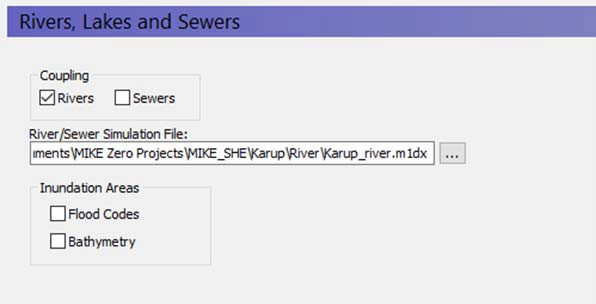
In this dialogue, you can link MIKE SHE to a MIKE 1D model that simulates rivers, a collection system, or both. The text box will accept a MIKE 1D setup (.m1dx) file exported from MIKE+. The .m1dx file has to be in the same directory as the original MIKE+ setup (.sqlite file). This is because of the relative paths stored in the .m1dx file. In addition, as of release 2025, the dialog will still accept extensions for models built in MIKE Hydro River (.hydro) file and MIKE 11 (.sim11). MIKE HYDRO River and MIKE 11 were discontinued after the 2023 release of MIKE software.
If the MIKE 1D setup includes a model of the collection system, then a .couple file is also required. It needs to be in the same directory as the .m1dx file and have the same name. Both the .m1dx and the .couple file need to be exported from the same MIKE+ setup. The couple file doesn't need to be specified in MIKE SHE.
Specification of sewer pipes and manholes to include in a coupled model is done in the MIKE+ GUI. Please have a look at the MIKE+ documentation for more information.
1.1 Considerations when linking MIKE SHE to a river model
In principle, there are three basic steps for developing an integrated MIKE SHE/river model:
- Establish a hydraulic river model as a stand-alone model, make a performance test and, if possible, a rough calibration using prescribed inflow and stage boundaries.
- Establish a MIKE SHE model that includes the overland flow component and (optionally) the saturated zone and unsaturated zone components.
- Couple MIKE SHE and the river model by defining branches (reaches) where the river should interact with MIKE SHE.
The chapter Coupling of MIKE SHE and a MIKE 1D River Model describes in more detail the three steps above.
1.2 Flooding and Inundation
Flow on the flood plain can be simulated by overbank spilling. However, this can be numerically intensive.
In many cases, you do not need to calculate the actual flow but only the water levels on the ground surface, for example in wetland areas on the flood plain. For such cases, you can use Flood Codes to define the inundated areas. See Flooding from a MIKE 1D river model to MIKE SHE using Flood Codes.
-
Flood codes - With this option, you can specify the Flood Code map that shows which cells flood during a storm event, or are otherwise covered with water (e.g. permanent wetlands).
-
Bathymetry - The bathymetry is used to more accurately simulate the topography of the flood code cells, when the MIKE SHE topography is specified on a larger grid.
1.3 Water Quality with Rivers
If you have selected Water Quality calculation for Rivers and Lakes in the Water Quality Simulation Specification dialog, then an extra river model setup specification will be displayed. In this text box, you must specify the file that contains the water quality model setup for the river. This may or may not be the same as the one specified for the water movement calculation.
The extra river model setup specification is required because the water quality model is run independently of the water movement model. In other words, the water movement model is run first, which calculates the exchange between the groundwater and surface flow, with the river model. Then the water quality model uses the water movement results to calculate the solute fluxes between the different water components. Thus, the water quality river model setup file could be different than the water movement setup file if you are running several solute transport scenarios. However, the river model setup files must be consistent. This consistency will be checked at run time.
The river model water movement results cannot be recycled in the same way that the rest of the MIKE SHE results can be. Your river simulation must cover the entire period of you water quality simulation.
Related Items:
- Water Quality Simulation Specification
- Channel Flow - Technical Reference
- Coupling of MIKE SHE and a MIKE 1D River Model
2. Flood codes
| Month | Savings |
|---|---|
| Conditions | If Rivers and Lakes selected in the Simulation Specification dialogue and Flood Codes selected in the River and Lakes dialogue |
| dialogue | Integer Grid Codes |
| EUM Data Units | Grid Code |
Flood codes are required when using the Flooding from a MIKE 1D river model to MIKE SHE using Flood codes. This requires a .dfs2 file with Integer Grid Codes which are then used for making the flood mapping for the coupling reaches.
Related Items:
- Coupling of MIKE SHE and a MIKE 1D River Model
- Flooding from a MIKE 1D river model to MIKE SHE using Flood Codes
3. Bathymetry
Conditions If Rivers and Lakes selected in the Simulation Specification dialogue and Bathymetry selected in the Rivers and Lakes dialogue
dialogue Type Stationary Real Data EUM Data Units Elevation
The bathymetry option allows you to specify a detailed flood plain and river bottom topography, which can then be used for more accurate definition of the topography in the flood code cells.
Note
This file is only used if the Bed Topography Option is set in the river model.